EasyCheck Cheque Printing Software Features: Bulk Printing, PDCs & Payment Vouchers
Online cheque printing software for your whole finance team, with a clear record behind every cheque.
EasyCheck is cloud-based cheque printing software for UAE and GCC businesses. Print single, bulk and post-dated cheques for any bank, track each cheque from printed to cleared, and print a payment voucher for every cheque.
- Unlimited cheque printing
- Unlimited bank cheque templates
- PDC printing and PDC calendar
- No installation, no special cheque printer
Plans start from AED 750. One-time payment, 3-year licence. See plans
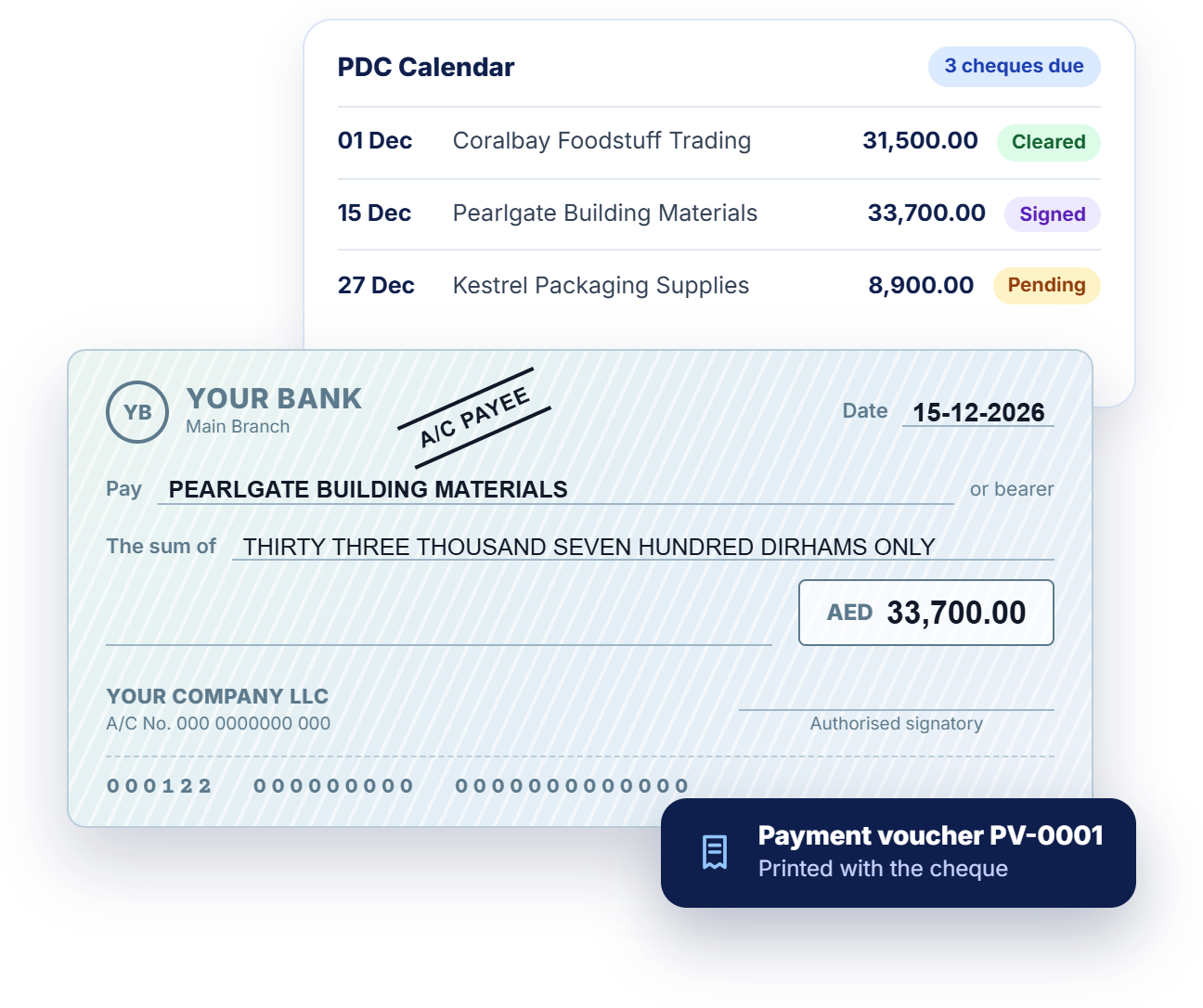
Shown with sample data.
All EasyCheck Features at a Glance
Batch and recurring cheque printing, PDC calendar, payment vouchers and more for UAE & GCC finance teams, in one cloud platform.
- Batch (bulk) cheque printing
- Single cheque printing on your own bank leaves
- Post-dated cheque (PDC) printing
- Recurring PDC printing with automatic dates
- Visual PDC calendar with alerts
- Automatic amount-to-words conversion
- Payment voucher scanning: auto-extract payee, amount & date
- Payment voucher printing for any cheque
- Visual cheque template designer (scan or measure)
- Unlimited bank templates for UAE & GCC banks
- Multi-bank management from one login
- Multi-currency: AED, SAR, QAR, OMR, BHD, KWD
- Cheque status tracking: cleared, uncleared & bounced
- Cheque collection & signed-status tracking
- Document attachment: invoices, LPOs, receipts
- Reports with Excel export
- Audit trail of every action
- Zoho Books integration
See EasyCheck Cheque Printing Software in Action
Six screens from the product. Open any one to read more about that feature.
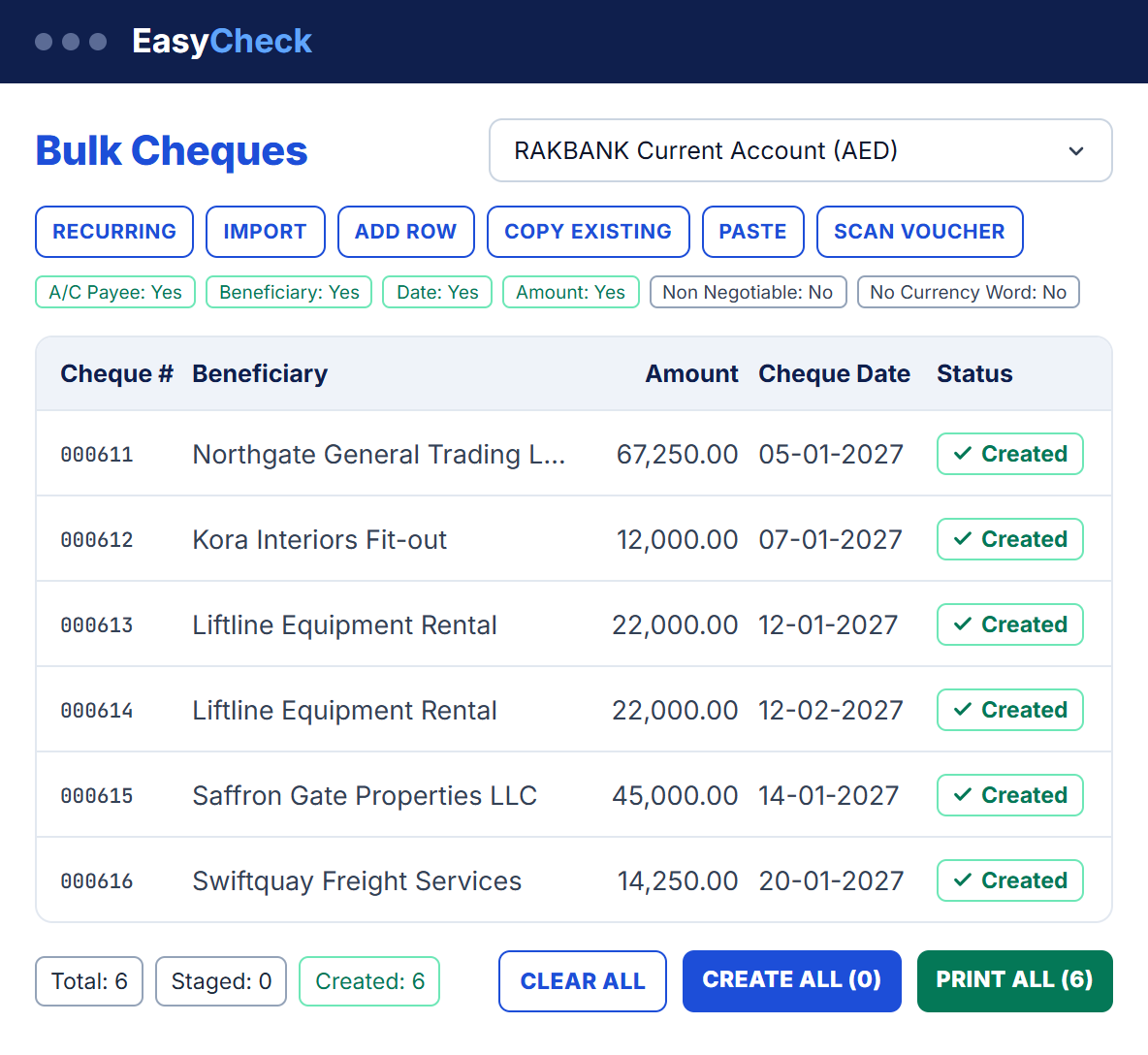
Bulk cheque printing
A whole payment run in one batch.
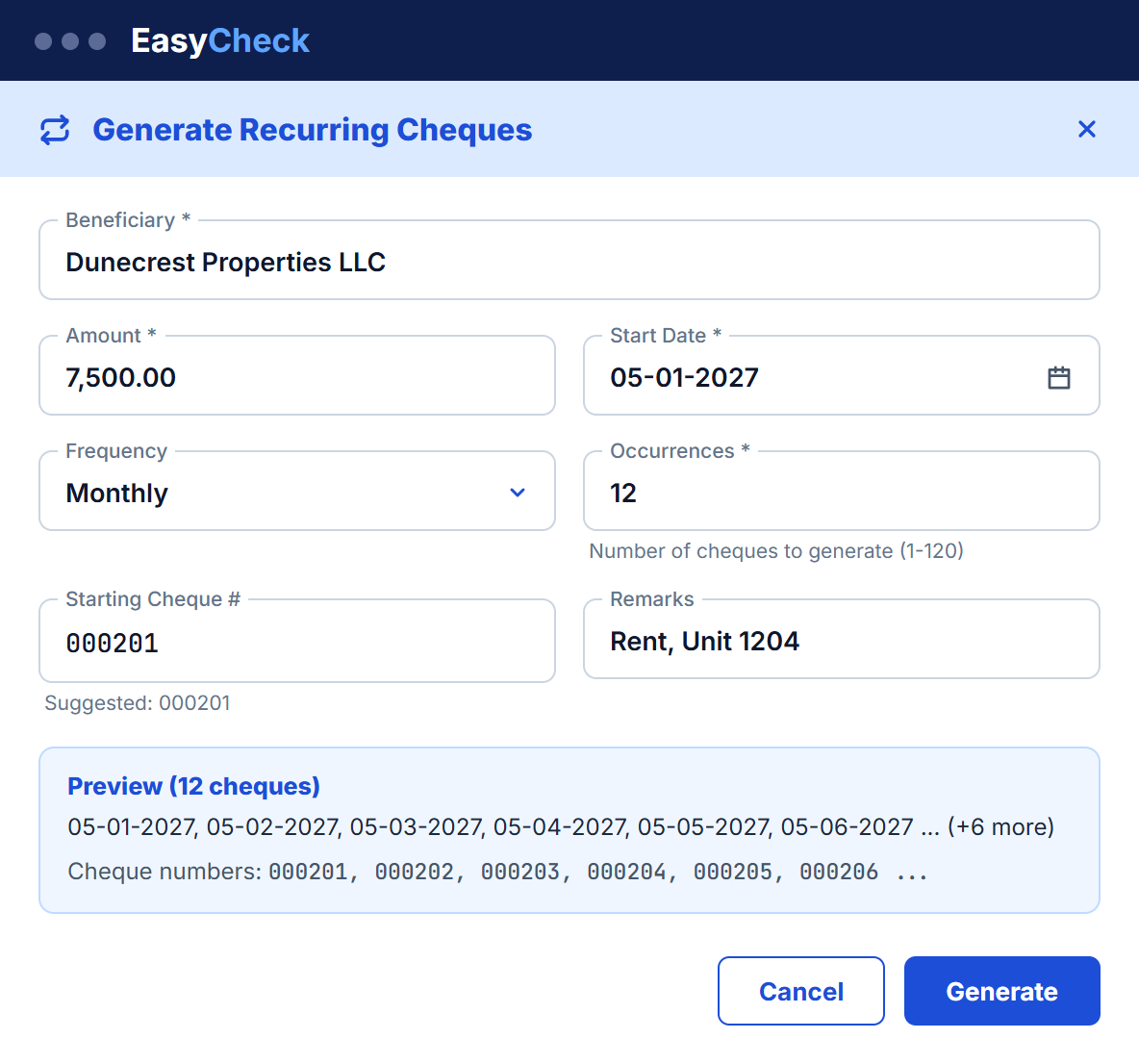
Recurring PDC printing
Up to 120 post-dated cheques from one entry.
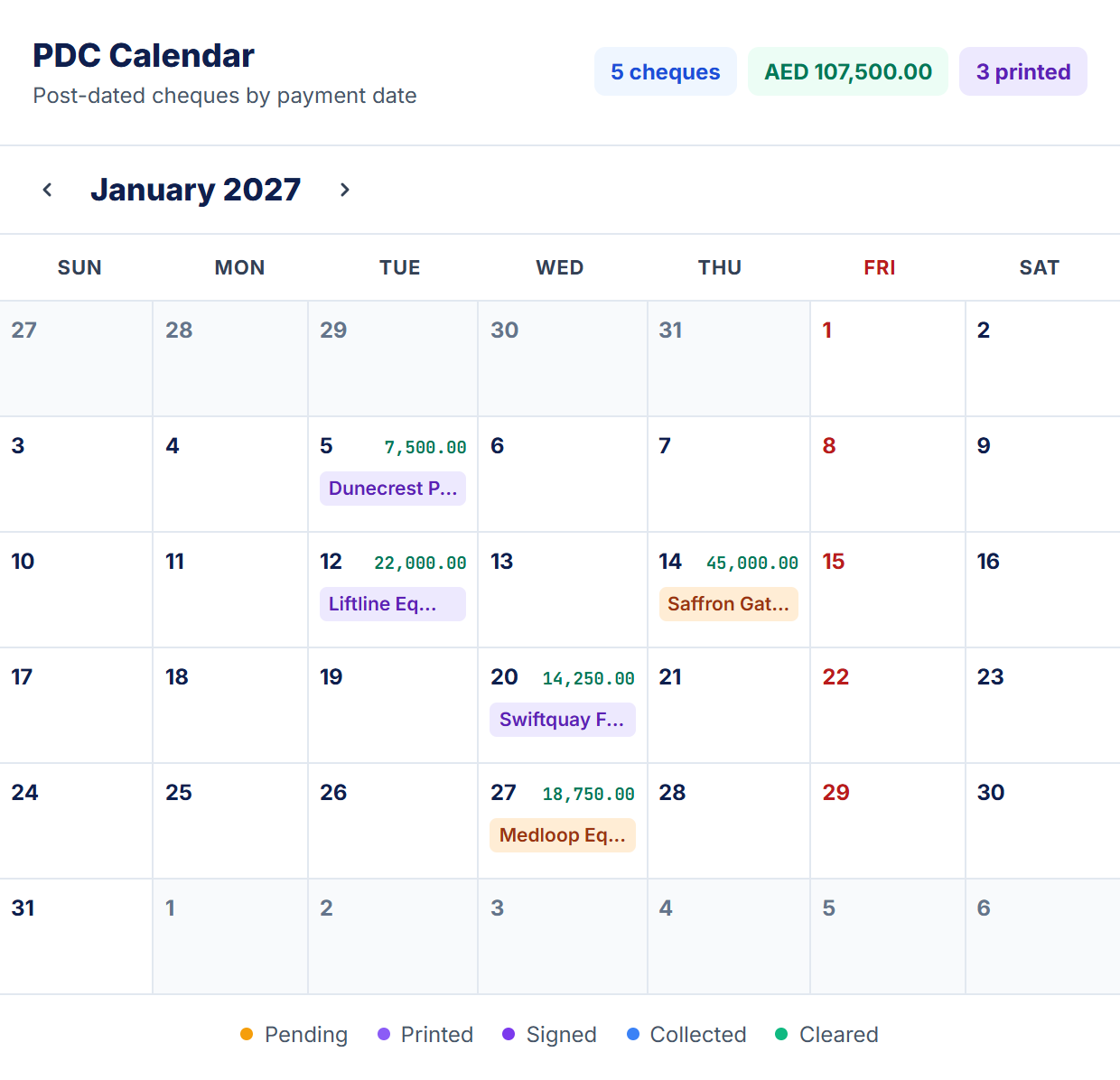
PDC Calendar
Every post-dated cheque on its date.
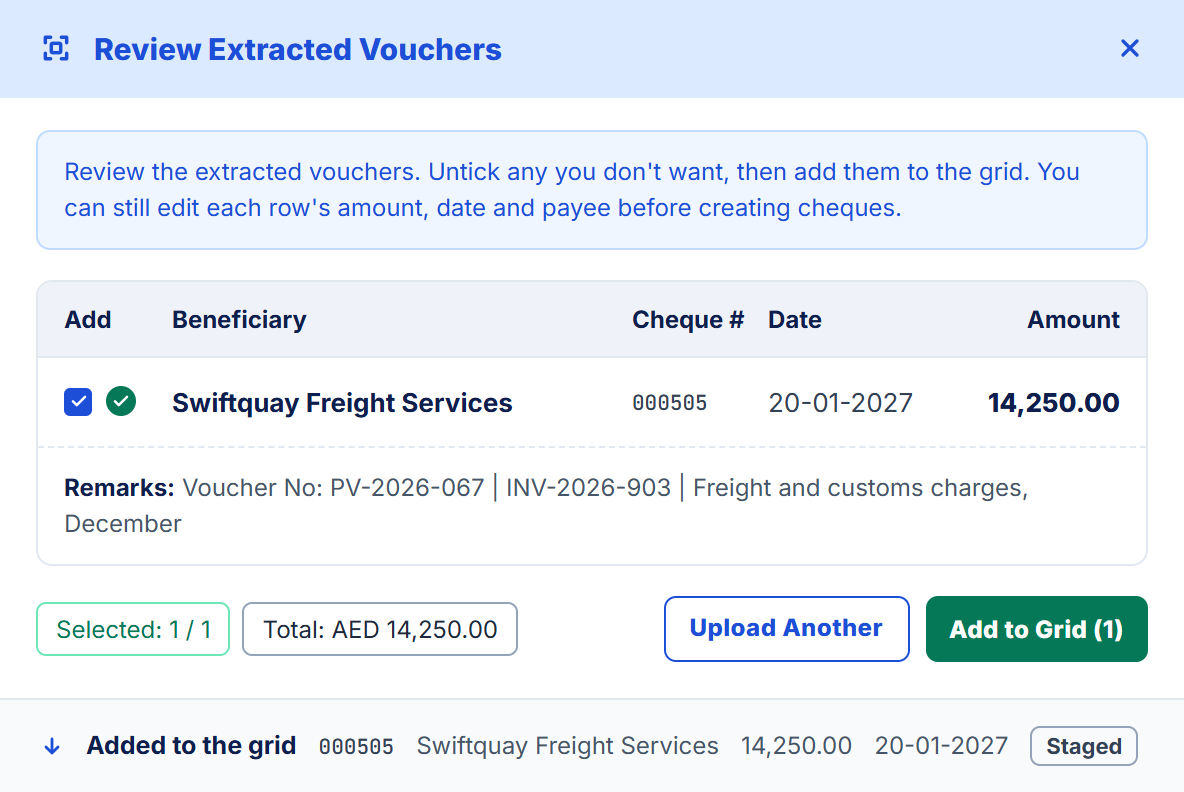
Payment voucher scanning
Upload a voucher, get a ready-to-print cheque.
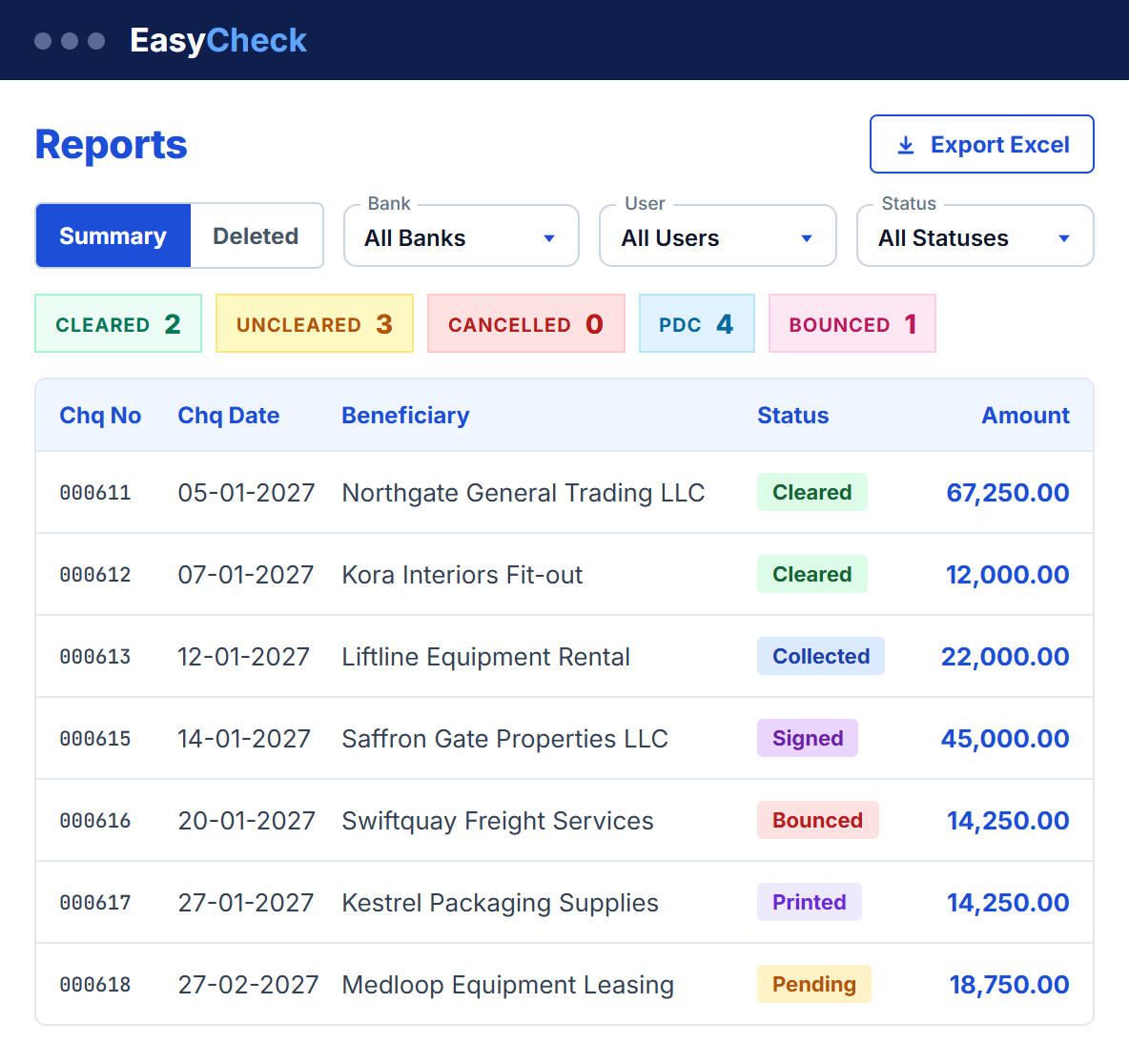
Cheque status and reports
Cleared, uncleared and bounced at a glance.
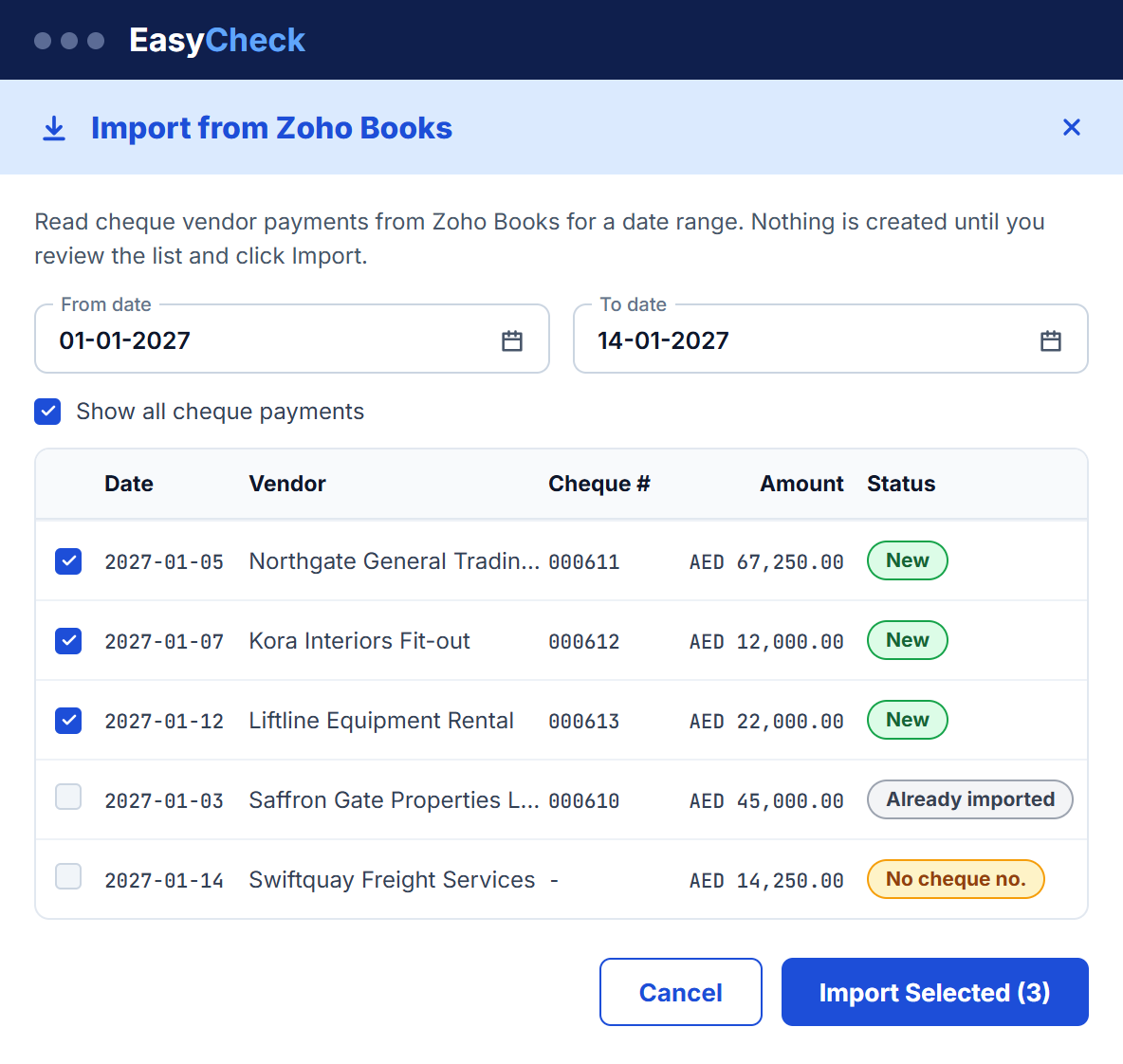
Zoho Books integration
Zoho Books payments become cheques.
Everything You Need to Manage Cheque Payments
From accurate printing to PDC tracking, reporting and audit-ready records: every part of the cheque workflow, in one platform.
Set up once
UAE & GCC Bank Cheque Templates
Set up a cheque template for any UAE or GCC bank from your own cheque book. Works with banks in the UAE, Qatar, Oman, Bahrain, Kuwait and KSA.
One platform: print cheques for any UAE or GCC bank without switching tools
- Works with all UAE & GCC bank cheque books
- Set up unlimited bank templates
- Auto-detect field positions from a scanned cheque
- Adjust with the visual measuring tool, or use the manual measurement method
Multi-Bank & Multi-Currency Cheque Printing
Print cheques from every bank account your company holds, with one login.
Every bank account in one place, each with its own cheque template
- Supports multiple bank accounts simultaneously
- Each account keeps its own cheque template
- Choose the bank account when you print
- AED, QAR, OMR, BHD, KWD and SAR currency support
Beneficiary Management
Keep all your payees in one beneficiary list, with quick search, import and export, and active status control.
All your payees in one place: search, select and print without re-entering details
- Unlimited beneficiary storage
- Bulk import from Excel
- Active/inactive status control
- Quick search and filtering
Print cheques
Smart Cheque Printing
Print professional cheques with automatic number-to-words conversion and date formatting, positioned on your own bank cheque leaf.
No more handwriting errors on your cheques
- Automatic amount-to-words conversion
- Post-dated cheque support
- Print preview before every cheque
- A/C Payee, Non-Negotiable and amount prefix/suffix options
- Print status tracking
- Standard laser printer compatibility
Bulk Cheque Printing
Print a whole payment run in one batch. Import cheques from Excel, paste rows or copy existing cheques, then review everything in a staged grid before printing.
A full supplier payment run, printed in one batch
- Bulk cheque import from Excel
- Paste up to 100 rows straight from a spreadsheet
- Copy existing cheques into a new batch
- Staged grid to review before printing
- Create all and print all in one run
PDC & Recurring Cheque Printing
Print post-dated cheques (PDCs) for rent, loans, supplier terms and instalment plans, for any UAE or GCC bank.
Post-dated cheques printed with the right date every time
- Post-dated cheque (PDC) printing on every plan
- Recurring PDC printing: up to 120 cheques in one batch (Business Plus and Premium)
- Automatic date sequencing: monthly, quarterly, half-yearly or yearly
- Preview dates and cheque numbers before generating
- Starting cheque number suggested for each run
Payment vouchers
Payment Voucher Scanning
Upload a payment voucher and EasyCheck automatically extracts the beneficiary, amount and cheque date, ready to print, with no manual data entry.
Upload a voucher, skip the typing: beneficiary, amount and date filled in for you
- Auto-extract beneficiary, amount and cheque date
- PDF, PNG or JPEG, one voucher or a multi-page PDF
- No manual typing or re-entry errors
- Speeds up batch and bulk cheque preparation
- Review and edit before the cheque is created
Payment Voucher Printing
Print a payment voucher for any cheque, filled from the cheque record, with your logo, voucher number, amount in words and signature lines.
Print the cheque and its payment voucher from one system
- Customise the voucher with your logo, header and field labels
- Automatic voucher numbering with your own prefix
- Signature lines for Prepared By, Approved By and Receiver
- Choose the date format and which fields print
Zoho Books Integration
Bring cheque payments from Zoho Books into EasyCheck, ready to print, with no retyping between the two systems.
Create the payment in Zoho Books, print the cheque in EasyCheck
- Each Zoho Books cheque payment arrives as a pending cheque
- Sync automatically, or import payments on demand
- Read-only access to your Zoho Books
- The same payment cannot be imported twice
Track every cheque
PDC Calendar & Alerts
See all your upcoming post-dated cheque payments in one visual monthly calendar, with alerts before each cheque falls due.
Track all your future payments visually, no Excel required
- Monthly calendar view of all PDC payments
- Colour-coded by status: Pending, Printed, Signed, Collected, Cleared
- Payment amounts and beneficiary names visible per date
- PDC alerts before the cheque date
- Total cheque count and value summary at a glance
Cheque Status, Signing & Collection Tracking
Follow every cheque from printed to cleared, including whether it has been signed and how it reached the payee.
Know where every cheque is, from print to clearance
- Cheque statuses: pending, printed, signed, collected, cleared, cancelled and bounced
- Cleared / Uncleared status, updated easily after bank confirmation
- Signed-status tracking: mark cheques signed by the authorised signatory before handover
- Cheque collection tracking for walk-in and courier delivery
Reports & Analytics
Track every cheque and monitor your payment operations from one screen. Filter by date, bank, user and status, and export in seconds.
See exactly what's pending, printed and cleared: searchable, filterable, exportable
- Print date, cheque date and collected date filtering
- Filter by bank, user and status
- Counts of cleared, uncleared, cancelled, PDC and bounced cheques
- Choose which columns to show
- Export to Excel for analysis and reconciliation
Control and records
Audit Trail
See who did what, and when. EasyCheck records each action on cheques, banks, users and settings, so audit questions are quick to answer.
Every action recorded against the user who did it
- Cheques created, edited, printed, cleared and cancelled
- Changes to banks, templates, beneficiaries and settings
- User sign-ins
- Admin-only viewer with filters by date, user and action
- Search and export
Document Attachment
Attach invoices, LPOs and receipts directly to each cheque record, so every payment is backed by its document.
Open any cheque and view its invoice, with no email or folder search
- Attach multiple documents per cheque
- Custom document types: define your own (Invoice, PO, Receipt, Delivery Note)
- 1 TB document storage
- View, download or delete attachments anytime
Cloud Access & Multi-User Support
Use EasyCheck in your browser, with nothing to install. Manage access with Admin and User roles so the right people have the right permissions.
Your whole team can use it from the office or remotely, with no IT setup
- Runs in your browser, with no desktop installation
- Works on Mac: MacBook in the browser, on Business Plus and Premium
- Multi-user support with Admin and User roles
- Choose which modules each user can open
- OTP login
- Back up and restore bank accounts and cheque templates, with template version history
Zoho Books Integration for Cheque Printing
Connect your accounting system and stop entering the same payment twice. A cheque payment recorded in Zoho Books comes into EasyCheck as a pending cheque, ready to print.
- No double entry between accounting and cheque printing
- Payee, amount, date and cheque number filled in for you
- Read-only access: EasyCheck never changes your Zoho Books
- The same payment cannot become two cheques
Two ways to sync Zoho Books payments
Automatic sync
Each cheque payment you record in Zoho Books is sent to EasyCheck and appears as a cheque ready to print.
Import on demand
Pick a date range, review the cheque payments found in Zoho Books and import the ones you want.
More Cheque Management Features for Finance Teams
Every detail covered, from template setup to print options and data management.
Auto-Detect Cheque Fields
Upload your cheque image and EasyCheck automatically detects field positions for the beneficiary, date, amount and more. Fine-tune them with the visual measuring tool.
Custom Print Options
Toggle A/C Payee, Non-Negotiable, amount prefix/suffix (**), beneficiary line 2, remarks and cheque-sized PDF, all configurable per print job. Admins can set company-wide print defaults, and long payee names wrap or shrink to fit.
Import Cheque History
Moving from another system? Upload an Excel file of cheques you have already printed, cleared or cancelled, with several banks in one file. EasyCheck validates the rows, checks for duplicates and creates missing payees for you.
Currency-Aware Amount in Words
The amount in words uses the right minor unit for each currency, such as fils, baisa or halala, and you can leave the currency name out. Supports AED, SAR, QAR, OMR, BHD, KWD, EGP and EUR.
Cheque Dashboard
Open EasyCheck to a dashboard of your cheques: status breakdown, month-on-month figures, a summary by bank and recent activity.
User Management
Admins add users, deactivate or reactivate them, and send password reset links. The user list filters by active, inactive and pending verification.
EasyCheck Features by Plan
One-time 3-year licence. No monthly fees and no per-cheque charges.
Business
AED 750
One-time, 3 years · Up to 2 users
- Unlimited cheque printing and bank templates
- PDC printing and PDC calendar
- Payment voucher printing
- Advanced reporting and audit trail
Business Plus
Most PopularAED 1,200
One-time, 3 years · Up to 5 users
- Everything in Business
- Bulk (batch) cheque printing with Excel import
- Recurring PDC printing, up to 120 cheques in one batch
- Payment voucher scanning
- Zoho Books integration
Premium
AED 3,000
One-time, 3 years · Up to 5 users
- Everything in Business Plus
- Document attachment with 1 TB document storage
- Priority 24/7 support
EasyCheck Features: Frequently Asked Questions
Quick answers about cheque printing software features in EasyCheck.
What features does EasyCheck cheque printing software include?
EasyCheck prints single, bulk and post-dated cheques onto your own bank cheque leaves, with automatic amount in words. It also includes a PDC calendar, cheque status tracking, payment voucher printing and scanning, reports with Excel export, an audit trail, document attachment and a Zoho Books integration.
Which EasyCheck features are included in every plan?
Every plan includes unlimited cheque printing, unlimited bank templates, PDC printing, the PDC calendar, payment voucher printing, cheque status tracking, signed status and cheque collection, reports and the audit trail. The Business plan is AED 750 as a one-time 3-year licence.
Which features need Business Plus or Premium?
Business Plus (AED 1,200) adds bulk cheque printing with Excel import, recurring PDC printing of up to 120 cheques, payment voucher scanning, the Zoho Books integration and up to 5 users. Premium (AED 3,000) adds document attachment with 1 TB of document storage and priority support.
Does EasyCheck work with all UAE and GCC banks?
Yes. You set up a cheque template from your own cheque book for each bank account, by scanning a cheque and positioning the fields or by entering measurements. Every plan includes unlimited templates, with support for AED, SAR, QAR, OMR, BHD and KWD.
Do I need a special cheque printer or any installation?
No. EasyCheck runs in your browser, with nothing to install, and prints on a standard office laser printer onto your own bank-issued cheque leaves.
Does EasyCheck integrate with accounting software?
Yes. On Business Plus and Premium, EasyCheck integrates with Zoho Books: cheque payments recorded in Zoho Books come into EasyCheck as ready-to-print cheques, either automatically or by importing them on demand.
Ready to Give Your Finance Team a Better Way to Manage Cheques?
Stop managing cheques in Excel and disconnected systems. Print, track, manage PDCs and store payment documents, all in one platform.
From AED 750. One-time payment, 3-year licence, no monthly fees.
Related Resources
More about EasyCheck cheque printing software.